> ## Documentation Index
> Fetch the complete documentation index at: https://calcomhelp-mintlify-onboarding-embed-1775238661.mintlify.site/llms.txt
> Use this file to discover all available pages before exploring further.
# Onboarding embed
> Embed Cal.com account creation and onboarding directly in your app so users never leave your site.
The onboarding embed lets you add Cal.com account creation, onboarding, and OAuth authorization directly inside your application. Your users create a Cal.com account, set up their profile, connect a calendar, and grant your app access — all without leaving your site.
 ## Prerequisites
Before using the onboarding embed, you need:
* An **OAuth client ID** from the Cal.com team. Fill out [this form](https://i.cal.com/forms/4052adda-bc79-4a8d-9f63-5bc3bead4cd3) to get started.
* A **redirect URI** registered on your OAuth client that shares the same origin (scheme + domain + port) as the page hosting the embed.
* The `@calcom/atoms` React package installed in your project.
```bash theme={null}
npm install @calcom/atoms
```
## How it works
The component opens a dialog containing an iframe that runs Cal.com's onboarding flow. Because the iframe runs on Cal.com's domain with a first-party session, no third-party cookies are needed.
The flow automatically detects where the user is:
* **No session** — starts at signup/login, then profile setup, calendar connection, and OAuth consent.
* **Session with incomplete onboarding** — resumes from where the user left off.
* **Session with complete onboarding** — skips straight to OAuth consent.
After the user grants access, you receive an authorization code that you exchange for access and refresh tokens.
## Two modes
The component supports two modes for receiving the authorization code:
* **Callback mode** — provide an `onAuthorizationAllowed` callback to receive the code directly. No page navigation occurs.
* **Redirect mode** — omit the callback and the browser navigates to your `redirectUri` with the code as a query parameter.
### Callback mode
Provide `onAuthorizationAllowed` to receive the authorization code directly. The dialog closes and your callback fires after the user authorizes — no page reload.
```tsx theme={null}
import { OnboardingEmbed } from "@calcom/atoms";
import { useState } from "react";
function App() {
const [state] = useState(() => crypto.randomUUID());
return (
{
fetch("/api/cal/exchange", {
method: "POST",
body: JSON.stringify({ code, state }),
});
}}
onError={(error) => console.error(error.code, error.message)}
onClose={() => console.log("Dialog dismissed")}
/>
);
}
```
### Redirect mode
Omit `onAuthorizationAllowed` and the browser navigates to your `redirectUri` after the user completes onboarding and grants access:
```
https://your-app.com/cal/callback?code=AUTHORIZATION_CODE&state=YOUR_STATE
```
```tsx theme={null}
import { OnboardingEmbed } from "@calcom/atoms";
import { useState } from "react";
function App() {
const [state] = useState(() => crypto.randomUUID());
return (
console.error(error.code, error.message)}
/>
);
}
```
## Props
| Prop | Type | Required | Description |
| ------------------------ | ------------------------------ | -------- | ---------------------------------------------------------------------------------------------------------- |
| `oAuthClientId` | `string` | Yes | Your OAuth client ID. |
| `host` | `string` | No | Cal.com host URL. Defaults to `https://app.cal.com`. |
| `theme` | `"light"` or `"dark"` | No | Theme for the embedded UI. Defaults to `"light"`. |
| `user` | `{ email?, name?, username? }` | No | Prefill user details in signup and profile steps. |
| `authorization` | See below | Yes | OAuth authorization parameters. |
| `onAuthorizationAllowed` | `({ code }) => void` | No | Called with the authorization code on success. Enables callback mode. If omitted, enables redirect mode. |
| `onError` | `(error) => void` | No | Called when an error occurs. |
| `onAuthorizationDenied` | `() => void` | No | Called when the user declines authorization. If omitted, the browser redirects with `error=access_denied`. |
| `onClose` | `() => void` | No | Called when the user dismisses the dialog. |
| `trigger` | `ReactNode` | No | Custom trigger element. Defaults to a "Continue with Cal.com" button. |
### Authorization props
| Prop | Type | Required | Description |
| --------------- | ---------- | ------------------ | ------------------------------------------------------------------------------------------------------------------- |
| `redirectUri` | `string` | Yes | One of the redirect URIs registered on your OAuth client. Must share the same origin as the page hosting the embed. |
| `scope` | `string[]` | Yes | OAuth scopes to request. Must be a subset of scopes registered on the OAuth client. |
| `state` | `string` | Yes | A unique CSRF token. Generate one per session and verify it matches when you receive the authorization code. |
| `codeChallenge` | `string` | For public clients | PKCE code challenge (S256 method). Required for public OAuth clients that cannot store a client secret. |
If the user signs up via Google, the `user` prop values are ignored — name, email, and username come from the Google account instead.
## Theming and custom trigger
The `theme` prop controls the appearance of the trigger button, the onboarding steps, and the authorization page.
| Light theme (default) | Dark theme |
| ----------------------------------------------------------------------------------------------------------------------------------------------------------------------------------------------------------------------------------------------------------------------------------------------------------------------------------------------------------------------------------------------------------------------------------------------------------------------------------------------------------------------------------------------------------------------------------------------------------------------------------------------------------------------------------------------------------------------------------------------------------------------------------------------------------------------------------------------------------------------------------------------------------------------------------------------------------------------------------------------------------------------------------------------------------------------------------------------------------------------------------------------------------------------------------------------------------------------------------------------------------------------------------------------------------------------------------------------------------------------------------------------------------------------------------------------------------------------------------------------------------------------------------------------------------------------------------------------------------------------------------------------------------------------------------------------------------------------------------------- | -------------------------------------------------------------------------------------------------------------------------------------------------------------------------------------------------------------------------------------------------------------------------------------------------------------------------------------------------------------------------------------------------------------------------------------------------------------------------------------------------------------------------------------------------------------------------------------------------------------------------------------------------------------------------------------------------------------------------------------------------------------------------------------------------------------------------------------------------------------------------------------------------------------------------------------------------------------------------------------------------------------------------------------------------------------------------------------------------------------------------------------------------------------------------------------------------------------------------------------------------------------------------------------------------------------------------------------------------------------------------------------------------------------------------------------------------------------------------------------------------------------------------------------------------------------------------------------------------------------------------------------------------------------------------------------------------------------------------------- |
| |
## Prerequisites
Before using the onboarding embed, you need:
* An **OAuth client ID** from the Cal.com team. Fill out [this form](https://i.cal.com/forms/4052adda-bc79-4a8d-9f63-5bc3bead4cd3) to get started.
* A **redirect URI** registered on your OAuth client that shares the same origin (scheme + domain + port) as the page hosting the embed.
* The `@calcom/atoms` React package installed in your project.
```bash theme={null}
npm install @calcom/atoms
```
## How it works
The component opens a dialog containing an iframe that runs Cal.com's onboarding flow. Because the iframe runs on Cal.com's domain with a first-party session, no third-party cookies are needed.
The flow automatically detects where the user is:
* **No session** — starts at signup/login, then profile setup, calendar connection, and OAuth consent.
* **Session with incomplete onboarding** — resumes from where the user left off.
* **Session with complete onboarding** — skips straight to OAuth consent.
After the user grants access, you receive an authorization code that you exchange for access and refresh tokens.
## Two modes
The component supports two modes for receiving the authorization code:
* **Callback mode** — provide an `onAuthorizationAllowed` callback to receive the code directly. No page navigation occurs.
* **Redirect mode** — omit the callback and the browser navigates to your `redirectUri` with the code as a query parameter.
### Callback mode
Provide `onAuthorizationAllowed` to receive the authorization code directly. The dialog closes and your callback fires after the user authorizes — no page reload.
```tsx theme={null}
import { OnboardingEmbed } from "@calcom/atoms";
import { useState } from "react";
function App() {
const [state] = useState(() => crypto.randomUUID());
return (
{
fetch("/api/cal/exchange", {
method: "POST",
body: JSON.stringify({ code, state }),
});
}}
onError={(error) => console.error(error.code, error.message)}
onClose={() => console.log("Dialog dismissed")}
/>
);
}
```
### Redirect mode
Omit `onAuthorizationAllowed` and the browser navigates to your `redirectUri` after the user completes onboarding and grants access:
```
https://your-app.com/cal/callback?code=AUTHORIZATION_CODE&state=YOUR_STATE
```
```tsx theme={null}
import { OnboardingEmbed } from "@calcom/atoms";
import { useState } from "react";
function App() {
const [state] = useState(() => crypto.randomUUID());
return (
console.error(error.code, error.message)}
/>
);
}
```
## Props
| Prop | Type | Required | Description |
| ------------------------ | ------------------------------ | -------- | ---------------------------------------------------------------------------------------------------------- |
| `oAuthClientId` | `string` | Yes | Your OAuth client ID. |
| `host` | `string` | No | Cal.com host URL. Defaults to `https://app.cal.com`. |
| `theme` | `"light"` or `"dark"` | No | Theme for the embedded UI. Defaults to `"light"`. |
| `user` | `{ email?, name?, username? }` | No | Prefill user details in signup and profile steps. |
| `authorization` | See below | Yes | OAuth authorization parameters. |
| `onAuthorizationAllowed` | `({ code }) => void` | No | Called with the authorization code on success. Enables callback mode. If omitted, enables redirect mode. |
| `onError` | `(error) => void` | No | Called when an error occurs. |
| `onAuthorizationDenied` | `() => void` | No | Called when the user declines authorization. If omitted, the browser redirects with `error=access_denied`. |
| `onClose` | `() => void` | No | Called when the user dismisses the dialog. |
| `trigger` | `ReactNode` | No | Custom trigger element. Defaults to a "Continue with Cal.com" button. |
### Authorization props
| Prop | Type | Required | Description |
| --------------- | ---------- | ------------------ | ------------------------------------------------------------------------------------------------------------------- |
| `redirectUri` | `string` | Yes | One of the redirect URIs registered on your OAuth client. Must share the same origin as the page hosting the embed. |
| `scope` | `string[]` | Yes | OAuth scopes to request. Must be a subset of scopes registered on the OAuth client. |
| `state` | `string` | Yes | A unique CSRF token. Generate one per session and verify it matches when you receive the authorization code. |
| `codeChallenge` | `string` | For public clients | PKCE code challenge (S256 method). Required for public OAuth clients that cannot store a client secret. |
If the user signs up via Google, the `user` prop values are ignored — name, email, and username come from the Google account instead.
## Theming and custom trigger
The `theme` prop controls the appearance of the trigger button, the onboarding steps, and the authorization page.
| Light theme (default) | Dark theme |
| ----------------------------------------------------------------------------------------------------------------------------------------------------------------------------------------------------------------------------------------------------------------------------------------------------------------------------------------------------------------------------------------------------------------------------------------------------------------------------------------------------------------------------------------------------------------------------------------------------------------------------------------------------------------------------------------------------------------------------------------------------------------------------------------------------------------------------------------------------------------------------------------------------------------------------------------------------------------------------------------------------------------------------------------------------------------------------------------------------------------------------------------------------------------------------------------------------------------------------------------------------------------------------------------------------------------------------------------------------------------------------------------------------------------------------------------------------------------------------------------------------------------------------------------------------------------------------------------------------------------------------------------------------------------------------------------------------------------------------------------- | -------------------------------------------------------------------------------------------------------------------------------------------------------------------------------------------------------------------------------------------------------------------------------------------------------------------------------------------------------------------------------------------------------------------------------------------------------------------------------------------------------------------------------------------------------------------------------------------------------------------------------------------------------------------------------------------------------------------------------------------------------------------------------------------------------------------------------------------------------------------------------------------------------------------------------------------------------------------------------------------------------------------------------------------------------------------------------------------------------------------------------------------------------------------------------------------------------------------------------------------------------------------------------------------------------------------------------------------------------------------------------------------------------------------------------------------------------------------------------------------------------------------------------------------------------------------------------------------------------------------------------------------------------------------------------------------------------------------------------- |
| |  |
You can replace the default button with your own element using the `trigger` prop:
```tsx theme={null}
Connect calendar}
{/* ...other props */}
/>
```
## Step-by-step walkthrough
Here is what the user sees when they click the trigger button:
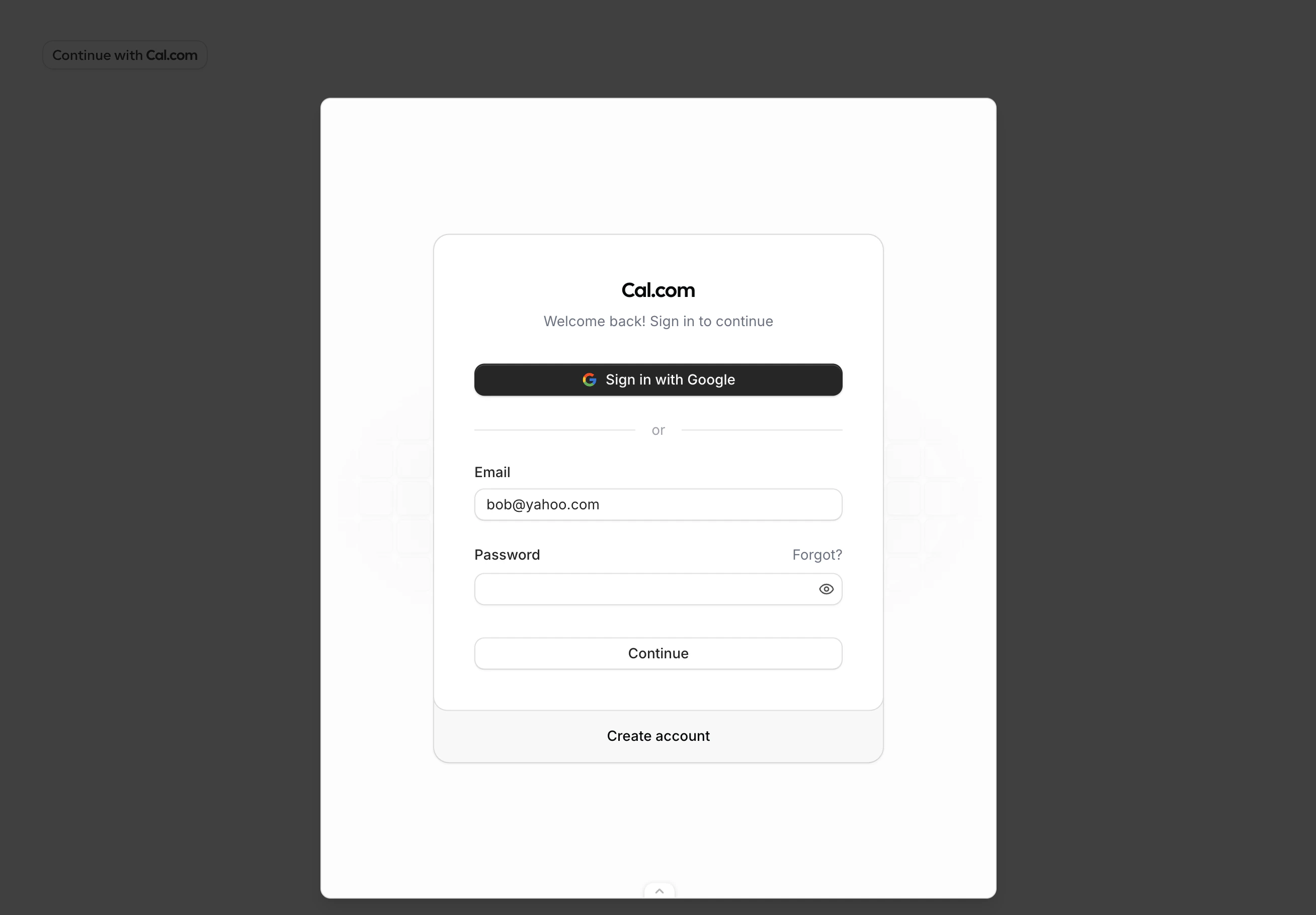
The dialog opens with a login form. Existing users sign in with email or Google. New users click "Create account" to sign up. The `user.email` prop prefills the email field.
|
You can replace the default button with your own element using the `trigger` prop:
```tsx theme={null}
Connect calendar}
{/* ...other props */}
/>
```
## Step-by-step walkthrough
Here is what the user sees when they click the trigger button:
The dialog opens with a login form. Existing users sign in with email or Google. New users click "Create account" to sign up. The `user.email` prop prefills the email field.
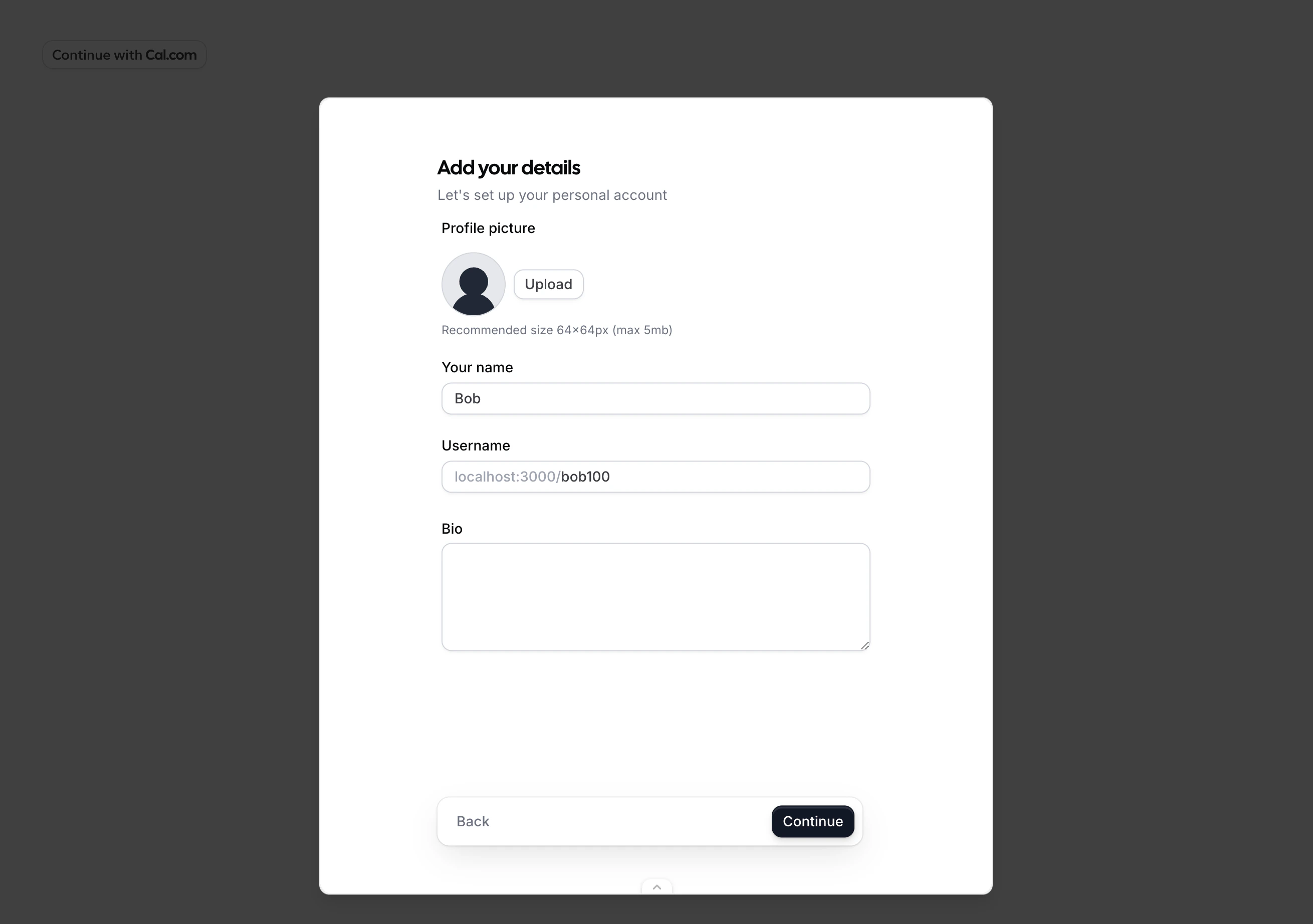
 After signing up, the user sets their display name. The `user.name` prop prefills this field.
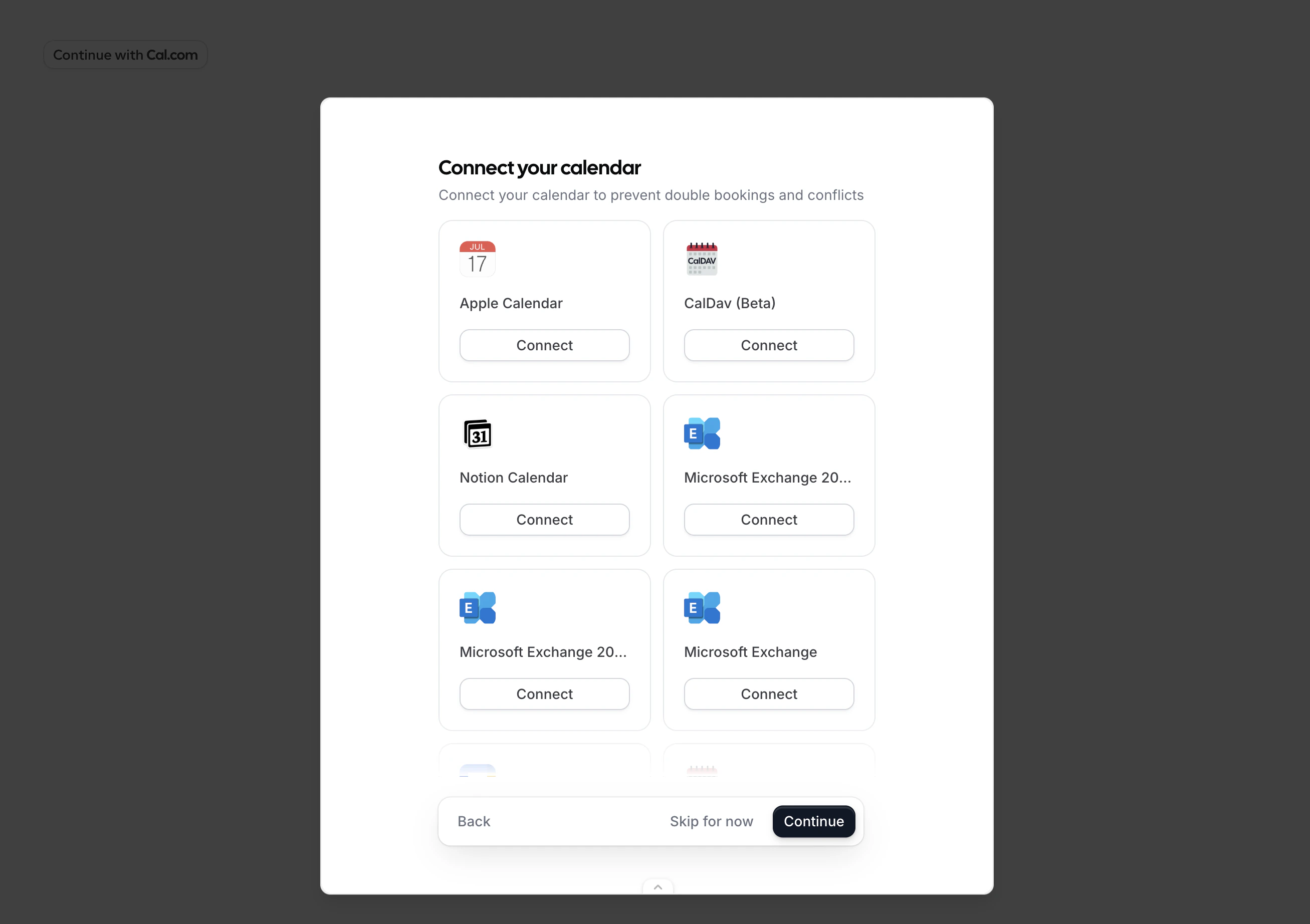
 The user can connect a calendar (such as Google Calendar) or skip this step.
 The user reviews the permissions your app requests and clicks "Allow". The displayed permissions correspond to the `scope` you passed to the component.
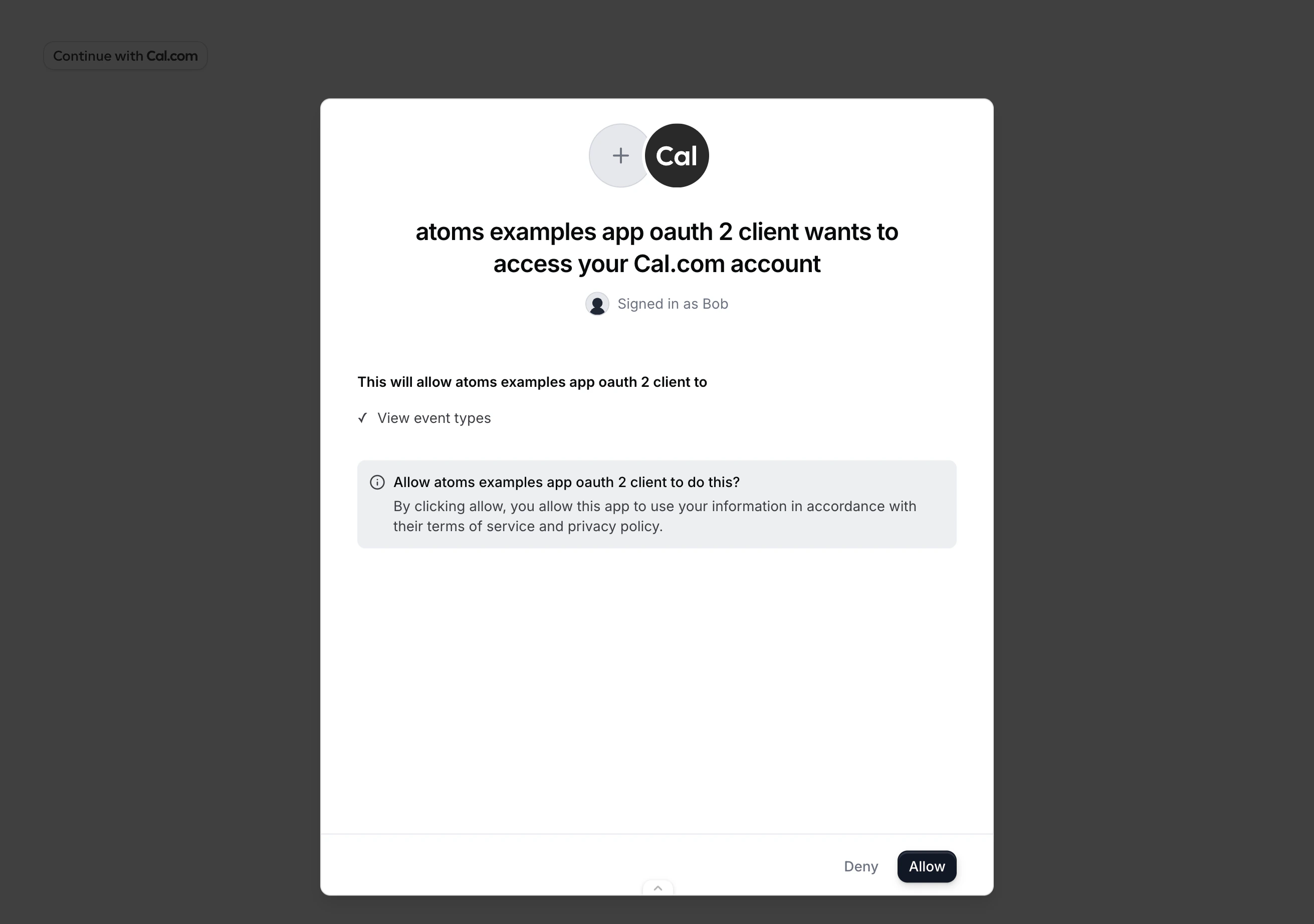 Your `onAuthorizationAllowed` callback fires with the authorization code, or the browser redirects to your `redirectUri`.
## Public clients (PKCE)
If your OAuth client cannot safely store a client secret (for example, a browser-only app), use PKCE to secure the authorization code exchange. Generate a `code_verifier`, derive a `code_challenge`, and pass it to the component:
```tsx theme={null}
import { OnboardingEmbed } from "@calcom/atoms";
import { useMemo, useState } from "react";
async function generatePkce() {
const array = new Uint8Array(32);
crypto.getRandomValues(array);
const codeVerifier = btoa(String.fromCharCode(...array))
.replace(/\+/g, "-").replace(/\//g, "_").replace(/=/g, "");
const digest = await crypto.subtle.digest(
"SHA-256",
new TextEncoder().encode(codeVerifier)
);
const codeChallenge = btoa(String.fromCharCode(...new Uint8Array(digest)))
.replace(/\+/g, "-").replace(/\//g, "_").replace(/=/g, "");
return { codeVerifier, codeChallenge };
}
export function MyApp() {
const state = useMemo(() => crypto.randomUUID(), []);
const [pkce, setPkce] = useState<{
codeVerifier: string;
codeChallenge: string;
} | null>(null);
useMemo(() => {
generatePkce().then(setPkce);
}, []);
if (!pkce) return null;
return (
{
const res = await fetch(
"https://api.cal.com/v2/auth/oauth2/token",
{
method: "POST",
headers: { "Content-Type": "application/json" },
body: JSON.stringify({
client_id: "your_client_id",
code_verifier: pkce.codeVerifier,
grant_type: "authorization_code",
code,
redirect_uri: "https://your-app.com/cal/callback",
}),
}
);
const { access_token, refresh_token } = await res.json();
}}
/>
);
}
```
## Error handling
The `onError` callback receives an error with a `code` and `message`:
| Code | What it means |
| ---------------------- | --------------------------------------------------------------------------------------------------------------------------------------------- |
| `INVALID_PROPS` | Required props are missing or invalid (for example, the `oAuthClientId` does not exist or the `redirectUri` does not match a registered URI). |
| `SIGNUP_FAILED` | Account creation failed. |
| `ONBOARDING_FAILED` | An error occurred during one of the onboarding steps. |
| `AUTHORIZATION_FAILED` | OAuth consent failed. |
| `STATE_MISMATCH` | The `state` in the response did not match what you provided. This could indicate a CSRF attack. |
| `UNKNOWN` | An unexpected error occurred. |
In redirect mode, errors are passed as query parameters on your `redirectUri`:
```
https://your-app.com/cal/callback?error=SIGNUP_FAILED&state=YOUR_STATE
```
Your `onAuthorizationAllowed` callback fires with the authorization code, or the browser redirects to your `redirectUri`.
## Public clients (PKCE)
If your OAuth client cannot safely store a client secret (for example, a browser-only app), use PKCE to secure the authorization code exchange. Generate a `code_verifier`, derive a `code_challenge`, and pass it to the component:
```tsx theme={null}
import { OnboardingEmbed } from "@calcom/atoms";
import { useMemo, useState } from "react";
async function generatePkce() {
const array = new Uint8Array(32);
crypto.getRandomValues(array);
const codeVerifier = btoa(String.fromCharCode(...array))
.replace(/\+/g, "-").replace(/\//g, "_").replace(/=/g, "");
const digest = await crypto.subtle.digest(
"SHA-256",
new TextEncoder().encode(codeVerifier)
);
const codeChallenge = btoa(String.fromCharCode(...new Uint8Array(digest)))
.replace(/\+/g, "-").replace(/\//g, "_").replace(/=/g, "");
return { codeVerifier, codeChallenge };
}
export function MyApp() {
const state = useMemo(() => crypto.randomUUID(), []);
const [pkce, setPkce] = useState<{
codeVerifier: string;
codeChallenge: string;
} | null>(null);
useMemo(() => {
generatePkce().then(setPkce);
}, []);
if (!pkce) return null;
return (
{
const res = await fetch(
"https://api.cal.com/v2/auth/oauth2/token",
{
method: "POST",
headers: { "Content-Type": "application/json" },
body: JSON.stringify({
client_id: "your_client_id",
code_verifier: pkce.codeVerifier,
grant_type: "authorization_code",
code,
redirect_uri: "https://your-app.com/cal/callback",
}),
}
);
const { access_token, refresh_token } = await res.json();
}}
/>
);
}
```
## Error handling
The `onError` callback receives an error with a `code` and `message`:
| Code | What it means |
| ---------------------- | --------------------------------------------------------------------------------------------------------------------------------------------- |
| `INVALID_PROPS` | Required props are missing or invalid (for example, the `oAuthClientId` does not exist or the `redirectUri` does not match a registered URI). |
| `SIGNUP_FAILED` | Account creation failed. |
| `ONBOARDING_FAILED` | An error occurred during one of the onboarding steps. |
| `AUTHORIZATION_FAILED` | OAuth consent failed. |
| `STATE_MISMATCH` | The `state` in the response did not match what you provided. This could indicate a CSRF attack. |
| `UNKNOWN` | An unexpected error occurred. |
In redirect mode, errors are passed as query parameters on your `redirectUri`:
```
https://your-app.com/cal/callback?error=SIGNUP_FAILED&state=YOUR_STATE
```